How to Choose the Right Electronic Medical Records System for Your Nigerian Hospital
Selecting an Electronic Medical Records (EMR) system is one of the most critical decisions your hospital will make. The right EMR can transform your operations, improve patient care, and increase revenue.
The wrong one can disrupt workflows, frustrate staff, and waste resources.
For Nigerian hospitals, the stakes are higher. You need a system that works within Nigeria’s unique healthcare landscape: intermittent power supply, variable internet connectivity, diverse patient populations, and tight budget constraints.
This guide walks you through everything you need to know to choose an EMR system that actually works for your Nigerian hospital.
Why Nigerian Hospitals Need Purpose-Built Solutions
Not all EMR systems are created equal. Systems built for hospitals in Europe or North America often fail in Nigerian settings.
Nigerian hospitals face unique challenges: Power outages, low bandwidth internet, aging IT infrastructure, and budget limitations. An EMR requiring constant high-speed connectivity will fail when power goes out. Western EMR systems can cost millions in licensing fees—far beyond what most Nigerian facilities can afford.
Your hospital also operates differently. Patient volumes are higher, paper records are still common, and cash payments dominate over insurance. Your EMR must accommodate these realities while meeting NDPR data protection requirements and NHIS protocols.
Step 1: Assess Your Hospital’s Specific Needs
Before evaluating vendors, understand what YOU actually need.

Consider these factors:
Size and Complexity – How many beds do you have? How many departments operate? What’s your daily patient volume? Do you have multiple locations?
Current Pain Points – What problems are you solving? Lost patient files? Long wait times? Revenue leakage? Inventory stockouts? Inability to track performance?
Staff Technical Capacity – How computer-literate is your staff? Do they use smartphones? Is there an IT department or will you need full vendor support?
Budget Constraints – What can you afford monthly or annually? Can you pay upfront or need payment plans?
Integration Requirements – Do you have existing systems that need to connect? Which HMOs must you integrate with? What medical devices need connectivity?
Create a document listing requirements in three categories: Must-Have, Nice-to-Have, and Not Needed. This becomes your evaluation scorecard.
Step 2: Essential Features to Look For
Core Clinical Features
Comprehensive Patient Records – Complete medical history accessible from any device. Visit notes, diagnoses, prescriptions, and test results in one searchable location with allergy and drug interaction alerts.
Digital Prescribing – Pre-loaded Nigerian drug database with dosage calculators, drug interaction warnings, and integration with pharmacy for seamless dispensing.
Laboratory Management – Test ordering directly from patient records, digital result entry, automatic delivery to doctors and patients, and integration with lab equipment.
Operational Features
Registration and Admission – Quick patient registration under 5 minutes, insurance verification, bed management, and queue management to reduce wait times.
Billing and Revenue Management – Automatic charge capture ensuring no unbilled services, multiple payment methods (cash, POS, transfer, insurance), HMO claims processing, and financial reports.
Inventory and Pharmacy – Real-time stock levels, automatic reorder alerts, expiry date tracking, and wastage reports.
Reporting and Analytics – Patient volume reports, doctor performance metrics, financial dashboards, and data export capabilities.
Step 3: Technical Requirements for Nigerian Context
This is where many international EMR systems fail. Your chosen system MUST handle Nigerian realities:
Infrastructure Resilience
Offline Functionality – The system should work when internet goes down. Critical functions like patient registration, vitals recording, and prescribing must be available offline with automatic syncing when connectivity returns.
Low Bandwidth Optimization – Should function smoothly on 2G/3G networks, not just 4G. Pages must load quickly even on slow connections.
Mobile-First Design – Most staff will access on smartphones and tablets. The interface must be touch-friendly, responsive, and functional on smaller screens.
Security and Compliance
Data Protection – NDPR compliant with HIPAA-level security standards, 256-bit encryption, secure cloud hosting with backups, and data residency in compliant jurisdictions.
Access Controls – Two-factor authentication, automatic logout after inactivity, password complexity requirements, and complete audit trails.
Integration Capabilities
HMO and Insurance Integration – Pre-authorization workflows, claims submission, payment reconciliation, and support for popular Nigerian HMOs (Hygeia, Avon, Reliance).
Payment Systems – Integration with Nigerian payment gateways like Paystack and Flutterwave, SMS gateways for notifications, and accounting software compatibility.
Step 4: Evaluate Vendors and Solutions
Request Live Demonstrations
Don’t just watch vendor videos. Insist on live demonstrations with real hospital scenarios, testing with your actual workflows, seeing mobile interfaces, and watching how offline mode works.
Key Questions to Ask:
How long does patient registration take?
What happens when internet goes down?
Can I customize forms and templates?
How do I run end-of-day financial reports?
How responsive is your support team?
Check References
Ask vendors for current hospital clients in Nigeria and permission to visit reference sites.
Questions for Reference Hospitals:
How long have you used this system?
What problems has it solved?
How responsive is vendor support?
Would you choose this system again?
Understand Total Cost of Ownership
Calculate the complete 3-year cost including software licensing, implementation fees, data migration, hardware requirements, monthly subscriptions, support fees, training costs, and customization charges.
Hidden costs to watch for: Training for new staff, integration with other systems, additional modules, and downtime during implementation.
Step 5: Red Flags to Avoid
Technical Red Flags:
Requires constant high-speed internet
No offline mode
Frequent crashes during demo
Confusing, non-intuitive interface
Vendor Red Flags:
Can’t provide Nigerian hospital references
Pushy sales tactics with unclear pricing
Poor communication or responsiveness
Based overseas with no local presence
Contract Red Flags:
Vendor owns your data
Multi-year lock-in with no exit clause
Vague service level agreements
No data export capabilities
Trust your instincts. If something feels off, it probably is.
Step 6: Implementation and Success
Choosing the system is only half the battle. Implementation determines success.
Set Realistic Timeline
Typical EMR implementation takes 6-8 weeks: needs assessment (Week 1-2), system configuration (Week 3-4), staff training (Week 5-6), pilot testing (Week 7), and full go-live with support (Week 8).
Training Strategy
Train super-users first, then have them train colleagues. Use hands-on practice with test data, department-specific training sessions, video tutorials, and quick reference guides.
Vendor Support Requirements
Look for vendors offering local support in Nigeria, multiple contact channels (phone, WhatsApp, email), response time guarantees within 2-4 hours, regular check-ins, and ongoing optimization support.
Ready to Explore Your Options?
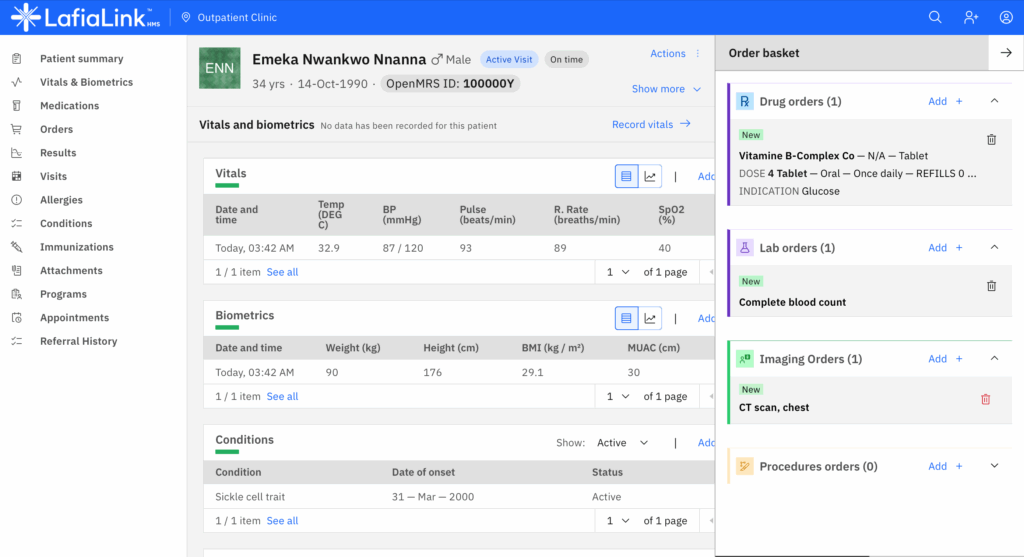
Axtute Digital Health offers LafiaLink EMR, a comprehensive hospital management system built specifically for African healthcare facilities.
LafiaLink works on low bandwidth, offers offline functionality, integrates with Nigerian HMOs, and is trusted by hospitals like Redwood Hospital in Abeokuta.
